A free open-source project called DiPlay is getting a lot of attention for bringing CarPlay to BYD cars that run Android on their screens. It needs no dongle, no jailbreak and no Mac. It is also brand new, and its makers call it an experimental preview. This post explains what it is, who it’s for, what people are already reporting, and what the risks are.
We have not tested DiPlay, because we don’t own a BYD. Everything here comes from the project’s own documentation, release notes and GitHub issues, as of September 30, 2026.
Quick answer
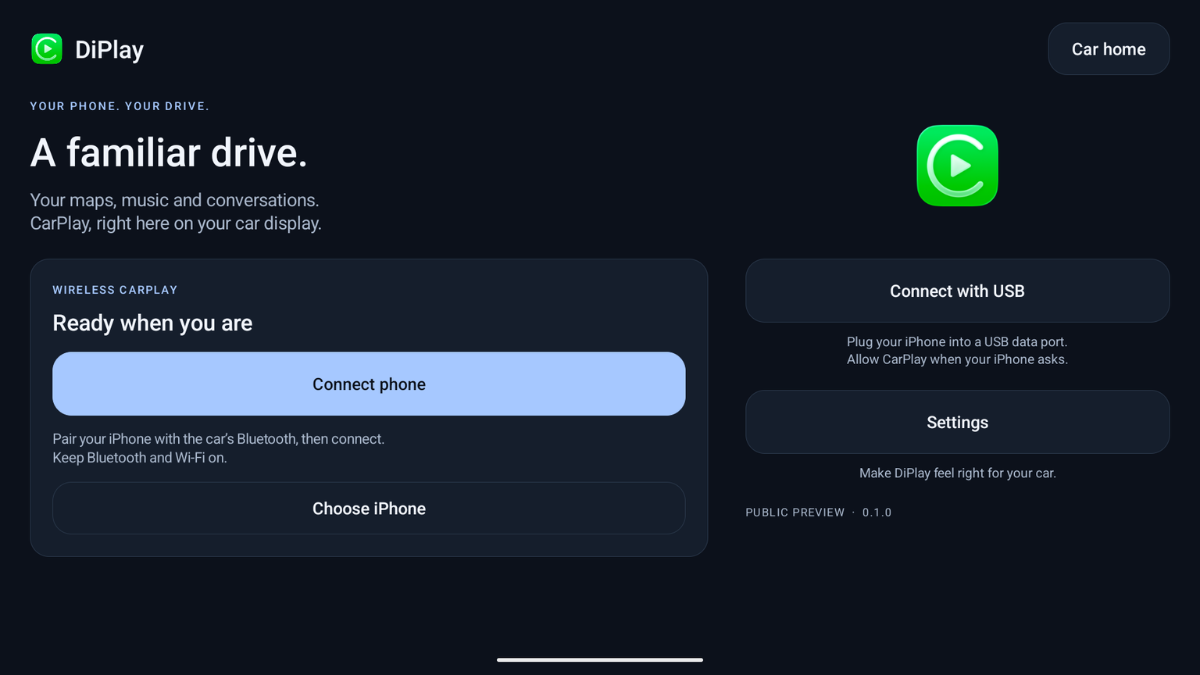
DiPlay is an Android app (APK) that you install on a BYD car’s head unit, not on your iPhone. It lets the car’s screen run CarPlay over USB or wirelessly. It’s free and open source (GPL-3.0). It is not Apple-certified and is still a public preview, and early users are reporting connection and audio problems.
What is DiPlay?
Many BYD cars run Android on the main screen and don’t come with CarPlay. DiPlay is an independent CarPlay receiver for those screens. According to its GitHub page, it works:
- Over a USB cable, on Android 9 or newer
- Wirelessly, over Wi-Fi Direct (Android 10 or newer) or the car’s hotspot
- With no Apple account, no login server and no dongle
It also adds BYD-specific extras, like navigation arrows on the dashboard display on supported firmware, steering-wheel media controls, and Siri access on supported firmware. You can also adjust the resolution, frame rate and icon and text size.
Performance settings
DiPlay lets you change the resolution, frame rate, and icon and text size. The project’s install guide recommends starting with 30 fps, with efficient video (HEVC) turned off and the default text size. If your car’s screen is slow, it suggests trying 80% or 60% resolution.
Changing a display setting reconnects CarPlay, so set it up while parked. The docs don’t list other frame rates, so we can’t say how smooth it runs on your car.
Who is it for?
Only BYD owners. The project says it was tested on BYD cars with DiLink 5.1. It says other brands “may work” but are unsupported, with no plans to fix problems on other brands. The head unit must also allow you to install APK files. If you don’t have a BYD, this project isn’t for you.
How installation works, according to the docs
This is a summary of the project’s install guide, not a walkthrough from our own test:
- Download the app from the project’s official GitHub releases page.
- Install it on the head unit using the unit’s own APK install method.
- Open DiPlay and allow the permissions it asks for (Bluetooth, Wi-Fi and location, microphone, notifications).
- Close any other phone-projection apps before connecting.
- Pick a connection method: wireless hotspot, Wi-Fi Direct or USB.
- Adjust the performance settings if needed.
The guide we read names version 0.2.6, while the newest release is 0.2.7. So the docs may be one version behind. Always follow the project’s current page.
How long has it existed?
Not long. The release list shows the first public preview on September 25, 2026. Version 0.2.7 came out on September 29. That’s a lot of changes in about five days, which is exciting, but it also means the software hasn’t had time to be tested widely.
What problems are people reporting?
The issues page already has about 32 open reports. Common ones include:
- Wireless CarPlay disconnecting repeatedly, including one report of about every 45 seconds
- The connection dropping and reconnecting on the car’s 5G hotspot
- Audio stuttering on at least one specific model
- A loop error after updating to version 0.2.6
- A report that wired CarPlay doesn’t work with iOS 26
The project itself says audio cutouts remain unresolved in the current version, and that the newly packaged 0.2.7 file lacks separate on-car testing.
The big risk: the Apple identity
This is the part most posts skip. CarPlay normally needs a hardware identity that Apple certifies (called MFi). DiPlay does not have its own. The README says the app bundles “an experimental accessory identity” recovered from public Carlinkit firmware. It also says a private key bundled in the app can be extracted.
The project is open about what that means. Whether it keeps working after future iOS updates, and whether that identity is suitable for wide distribution, are listed as unresolved. In plain words: an iOS update could stop it working, and Apple has not approved it.
Other things to think about before installing anything
- Copies exist. Several other repositories carry the same DiPlay name. Only download from the project’s own page, and read the repository before you trust an APK. Installing an unknown APK on your car’s screen is a real security risk.
- It’s your car. Modifying your car’s software might affect your warranty or dealer support. Check with your dealer or owner’s manual first.
- Don’t fiddle while driving. Set up and troubleshoot with the car parked.
- Keep an exit plan. If it breaks after an update, you should be able to go back to how the car worked before.
Should you try it?
If you own a compatible BYD and you’re comfortable with APK installs, it’s an interesting project to follow. If you rely on CarPlay every day, wait. A version that drops the connection every 45 seconds is not something you want on a daily drive. Watch the issues page and wait for a few releases without major bugs.
FAQ
Is DiPlay free?
Yes. It’s open source under GPL-3.0.
Do I need a jailbreak?
No. You install the app on the car’s head unit, and your iPhone stays stock.
Does it work on other cars?
The project only supports BYD. Other brands may work, but they’re unsupported.
Is it official CarPlay?
No. It is not Apple-certified.
How is DiPlay different from Zlink?
Zlink is the CarPlay and Android Auto app that comes pre-installed on many aftermarket Android head units, from brands like Dasaita, Atoto and Joying. It’s closed-source, and the head unit maker sets it up. DiPlay is a separate, free, open-source app (GPL-3.0) that you install yourself on BYD head units.
They do a similar job. Both run on the car’s screen, not your phone, and neither needs a dongle. The difference is who makes them and who supports them. With Zlink, the head unit brand ships and supports it. With DiPlay, it’s a community project in public preview with no official support.
DiPlay also adds BYD-specific features, like dashboard navigation arrows and steering-wheel controls on supported firmware. Zlink is a general app for many head units. We haven’t compared the two on a real car, so we can’t say which connects better or looks smoother.
What frame rate does DiPlay use?
The install guide recommends starting at 30 fps. The docs don’t list other options.
Will it keep working after iOS updates?
Nobody can promise that. The project says acceptance after future iOS updates is unresolved.
Is it safe?
The official project is open source, but it’s experimental. Copies with the same name exist, so download only from the original repository.
Final Thoughts
DiPlay shows how much people want CarPlay in cars that don’t offer it. It’s early, it’s unofficial, and it has real bugs. If you own a BYD, follow the project and read the issues before you install. We’ll update this post if it changes. Got one running? Tell us what happened in the comments.