Sideloading means putting an app on your iPhone that did not come from the App Store. You do not need a jailbreak, and you do not need to pay. On iOS 27 it still works, but free setups are fragile, and most guides skip that part. This guide shows the free method with SideStore, the limits you will hit, and what to do when something breaks.
Disclaimer: This guide is for educational purposes. Only install apps from sources you trust.
Quick answer
You can sideload on iOS 27 for free with SideStore, a free Apple Account, and a computer for the first install. You must turn on Developer Mode first. Free accounts are limited to 3 apps at a time, and apps need a refresh every 7 days, which SideStore does for you in the background.
Does sideloading still work on iOS 27?
Yes, with a warning. Developer Mode is still in Settings under Privacy & Security, and the certificate method that powers sideloading still works. Builds.io reported SideStore running on the iOS 27 beta.
The warning is that free tools tend to break after new iOS updates until the developers patch them. Some users reported problems on the iOS 27 beta. AltStore Classic was hit hardest, and SideStore had a UDID bug on some devices.
Also know this: the SideStore docs cover iOS 15 through iOS 18 and newer, but they do not name iOS 27 directly. So treat iOS 27 as “works for many people, not officially promised.”
What you need
- An iPhone with a passcode, running iOS 27
- A free Apple Account (Apple ID)
- A computer: Mac, Windows or Linux
- A USB cable
- A Wi-Fi connection (mobile data does not work for this)
- 20 to 30 minutes, in case something needs fixing
Step 1: Install LocalDevVPN on your iPhone
- Open the App Store and install LocalDevVPN.
- Open it and tap Connect.
- Allow the VPN configuration when iOS asks.
SideStore needs this VPN turned on whenever you install, update or refresh apps. It does not send your traffic anywhere. It is a local tool that lets the phone talk to itself.
Step 2: Turn on Developer Mode
- Open Settings.
- Tap Privacy & Security.
- Scroll down and tap Developer Mode.
- Turn it on. Your iPhone restarts.
- After the restart, confirm the prompt and enter your passcode.
If you do not see Developer Mode yet, it usually appears after you connect the iPhone to a computer and start the install in Step number 3 mentioned next. Come back to this step then.
Step 3: Install SideStore with iloader
- On your computer, download iloader from the official SideStore documentation at https://docs.sidestore.io. On Windows, install iTunes first. On Linux, install
usbmuxdfirst. - Connect your iPhone with the USB cable and tap Trust on the phone.
- Open iloader and sign in with your Apple Account.
- Select your iPhone and choose Install SideStore (Stable).
Always download tools from the official docs, not from a video description or a random site. Fake versions of these tools exist.
Step 4: Trust SideStore on your iPhone
- Open Settings, then General, then VPN & Device Management.
- Under Developer App, tap your Apple Account name.
- Tap Trust.
- Open LocalDevVPN and tap Connect.
- Open SideStore and sign in with the same Apple Account.
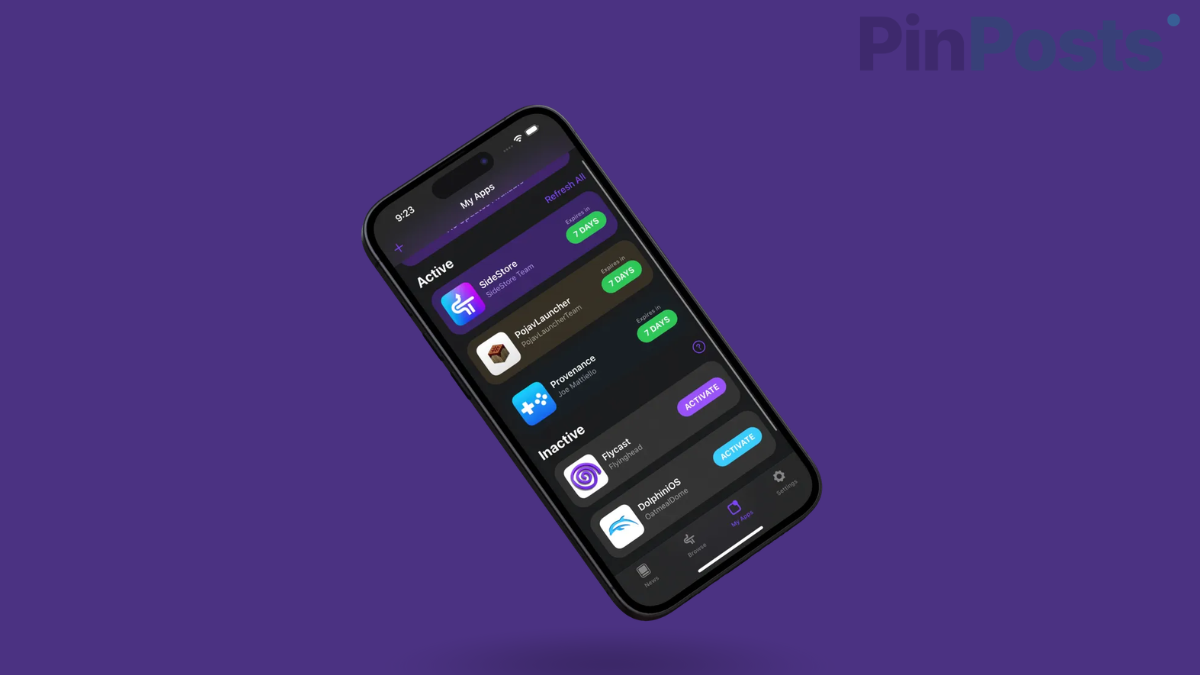
- Go to My Apps and tap the 7 DAYS counter to refresh.
- Confirm any certificate prompts.
If SideStore opens and shows My Apps, the install worked.
Step 5: Install your first app
Add the app’s .ipa file or a trusted source inside SideStore, then tap install. Keep LocalDevVPN connected while it installs. Start with a single app you already trust, so that if something goes wrong you know which app caused it.
The limits of free sideloading
Free sideloading has clear limits. Know them before you start:
- 3 apps at a time, and SideStore counts as one of them.
- 10 different apps per week.
- 7 days: each app expires after 7 days unless it is refreshed. SideStore does this in the background while LocalDevVPN is on.
- A paid Apple Developer account ($99 a year) removes the 3-app limit and lasts 365 days. Most people do not need this.
What to do when it breaks
Free setups break more than paid ones, so plan for it.
The app will not refresh
Open LocalDevVPN, tap Connect, then refresh again from My Apps. This is the most common cause.
The app expires after 7 days
This means the background refresh did not run. Open SideStore on Wi-Fi with the VPN connected and refresh manually.
SideStore stops working after an iOS update
This is normal. Your pairing file may expire when you update or reset your iPhone. You will need to make a new one. Check the SideStore docs and update iloader before you try again.
Something looks wrong right after installing
Restart the iPhone, reconnect LocalDevVPN and try again. If it still fails, reinstall SideStore from iloader.
Do not update your iPhone right before you need sideloading to work. Wait a few days and check the SideStore GitHub page and Discord for reports first.
Is sideloading safe?
It is only as safe as the app you install. A sideloaded app has no App Store review. It can read the data you give it, so treat it like any download from the internet.
- Prefer open-source apps you can check.
- Avoid apps that ask for your Apple password inside the app.
- Never install cracked or modified paid apps. Malware is common there.
- Use a free Apple Account made for this, if you want to keep your main one separate.
Why do this at all?
People sideload for open-source tools, emulators, apps that are not in their country’s App Store, and customization tools. Some of these do things Apple’s own apps do not allow.
If you want more no-jailbreak options for iOS 27, read our guides on customizing Apple Wallet cards with AirCard and Nugget on iOS 27.
You May Need to Know
Do I need a jailbreak to sideload on iOS 27?
No. Sideloading uses Developer Mode and a signing certificate from your Apple Account. It does not modify iOS.
Is SideStore free?
Yes. You only need a free Apple Account. A paid developer account is optional.
Do I need a computer every time?
No. You need a computer once for the first install. After that, SideStore refreshes apps on the phone, as long as LocalDevVPN is on.
Why do sideloaded apps expire after 7 days?
Free Apple Accounts sign apps for 7 days only. SideStore refreshes them in the background to reset the counter.
Can I use SideStore on an older iPhone?
SideStore supports iOS 15 and newer, so many older iPhones work. For iOS 27, check that your iPhone model supports it first.
Will sideloading break my iPhone?
Sideloading itself does not. A bad app can cause problems, so only install apps you trust.
Final Thoughts
Sideloading on iOS 27 is possible and free, but it is not set-and-forget. Turn on Developer Mode, install SideStore, keep LocalDevVPN handy, and start with one app.
Wait a few days before updating iOS, and check the SideStore docs when something stops working. If you get stuck, tell us in the comments and we will help.